Swift Observation: in-depth analysis
Introduced in 2023, the Observation framework aims to simplify existing reactive mechanisms while improving application performance.
This new approach relies on the automatic tracking of data accesses via the withObservationTracking(_:onChange:) method.
In this article, we will experiment with this method to understand how it works and its limitations.
General principles
The Observation framework is based on the use of reference types. The @Observable macro can only be applied to classes, not structures. Therefore, applications relying on value semantics will first need to transition to reference semantics, a task that can be complex.
A class annotated with @Observable detects and records accesses to its properties. Only accesses to stored properties are taken into account. However, access can be indirect, for example, through a function or a computed property. If a chain of calls ultimately results in access to a stored property, Observation detects it.
Both read and write accesses are detected. Read accesses are used to identify dependencies, while write accesses send change notifications.
A simple example
Note: All code presented works as is in a playground.
import SwiftUI

@Observable
class TestClass {
    var str = "test"
}
var test = TestClass()

withObservationTracking {
    let _ = test.str
} onChange: {
    print("str changed")
}

print("Changing str")
test.str = "new"
Result:
Changing str
str changed
In this example, we declare an observable class with a simple property and create an instance of it. We access the object’s property in the apply block of withObservationTracking(_:onChange:). The read access is detected and recorded. Finally, by modifying the property’s value from outside, the write access is also detected, resulting in the invocation of the onChange block.
Observation is attached with read access
If we modify the code to perform a write access instead of a read access in the apply block, we find that the change is not detected:
import SwiftUI

@Observable
class TestClass {
    var str = "test"
}
var test = TestClass()

withObservationTracking {
    test.str = "write"
} onChange: {
    print("str changed")
}

print("Changing str")
test.str = "new"
Result:
Changing str
It turns out that only read accesses connect the observation. This makes sense: a component that only writes does not need to be informed of value changes.
The write access always triggers the notification
If we write to the property by passing a value identical to the existing value, the change notification is still sent:
import SwiftUI

@Observable
class TestClass {
    var str = "test"
}
var test = TestClass()

withObservationTracking {
    let _ = test.str
} onChange: {
    print("str changed")
}

print("Changing str")
test.str = "test"
Result:
Changing str
str changed
Write accesses always trigger a change event, even if the value does not actually change. If the developer wants to trigger the event only if the value actually changes, it’s up to them to ensure that they write to the variable only if the new value is different.
Only read properties are observed
By adding a second property, we find that only a change to the property read in apply triggers a change:
import SwiftUI

@Observable
class TestClass {
    var str1 = "test1"
    var str2 = "test2"
}
var test = TestClass()

withObservationTracking {
    let _ = test.str1
} onChange: {
    print("str1 changed")
}
withObservationTracking {
    let _ = test.str2
} onChange: {
    print("str2 changed")
}

print("Changing str2")
test.str2 = "new"
Result:
Changing str2
str2 changed
Only the blocks attached to the properties that change are called. This represents a major improvement over previous techniques, where the object as a whole was observed. This increased granularity can enhance performance by limiting updates to the parts that are actually affected.
In-depth study: value semantics
For types with value semantics, which include all primitive types, as well as arrays and dictionaries, and also structures, the change notification is sent as soon as the value changes.
We have already seen examples earlier for primitive types like String. The case of arrays, dictionaries, and structures is interesting, albeit entirely logical.
Arrays
In the case of an array, changing a value in the array changes the overall value of the array, thus sending a change to any observer attached to all or part of the array:
import SwiftUI

@Observable
class TestClass {
    var arr = ["test1", "test2"]
}
var test = TestClass()

withObservationTracking {
    let _ = test.arr
} onChange: {
    print("arr changed")
}
withObservationTracking {
    let _ = test.arr[0]
} onChange: {
    print("arr[0] changed")
}
withObservationTracking {
    let _ = test.arr[1]
} onChange: {
    print("arr[1] changed")
}

print("Changing arr[0]")
test.arr[0] = "new"
Result:
Changing arr[1]
arr changed
arr[0] changed
arr[1] changed
Dictionaries
The same principle applies to dictionaries:
import SwiftUI

@Observable
class TestClass {
    var dict = ["1": "test1", "2": "test2"]
}
var test = TestClass()

withObservationTracking {
    let _ = test.dict
} onChange: {
    print("dict changed")
}
withObservationTracking {
    let _ = test.dict["1"]
} onChange: {
    print("dict['1'] changed")
}
withObservationTracking {
    let _ = test.dict["2"]
} onChange: {
    print("dict['2'] changed")
}

print("Changing dict['1']")
test.dict["1"] = "new"
Result:
Changing dict['2']
dict changed
dict['1'] changed
dict['2'] changed
Structures
Similarly for structures, changing a member changes its total value:
import SwiftUI

@Observable
class TestClass {
    var value = TestValue()
}
struct TestValue {
    var str1 = "test"
    var str2 = "test"
}
var test = TestClass()

withObservationTracking {
    let _ = test.value
} onChange: {
    print("value changed")
}
withObservationTracking {
    let _ = test.value.str1
} onChange: {
    print("value.str1 changed")
}
withObservationTracking {
    let _ = test.value.str2
} onChange: {
    print("value.str2 changed")
}

print("Changing value.str1")
test.value.str1 = "new"
Result:
Changing value.str1
value changed
value.str1 changed
value.str2 changed
In-depth study: reference semantics
For types with reference semantics, the change notification is sent as soon as the reference changes. Consequently, all accesses to the properties of the referenced objects also receive the update:
import SwiftUI

@Observable
class TestClass {
    var ref = TestRef()
}
class TestRef {
    var str = "test"
}
var test = TestClass()

withObservationTracking {
    let _ = test.ref
} onChange: {
    print("ref changed")
}
withObservationTracking {
    let _ = test.ref.str
} onChange: {
    print("ref.str changed")
}

print("Changing ref")
test.ref = TestRef()
Result:
Changing ref
ref changed
ref.str changed
Note that, as seen earlier, the change is triggered even if no value actually changes (ref.str remains "test" before and after, and we would have the same result if we had done test.ref = test.ref).
Changes in a referenced object
Unlike the structures seen earlier, by default, writing to a property in a reference object does not trigger a change:
import SwiftUI

@Observable
class TestClass {
    var ref = TestRef()
}
class TestRef {
    var str = "test"
}
var test = TestClass()

withObservationTracking {
    let _ = test.ref
} onChange: {
    print("ref changed")
}
withObservationTracking {
    let _ = test.ref.str
} onChange: {
    print("ref.str changed")
}

print("Changing ref.str")
test.ref.str = "new"
Result:
Changing ref.str
To ensure that this is the case, we simply need to make the class @Observable:
import SwiftUI

@Observable
class TestClass {
    var ref = TestRef()
}
@Observable
class TestRef {
    var str = "test"
}
var test = TestClass()

withObservationTracking {
    let _ = test.ref
} onChange: {
    print("ref changed")
}
withObservationTracking {
    let _ = test.ref.str
} onChange: {
    print("ref.str changed")
}

print("Changing ref.str")
test.ref.str = "new"
Result:
Changing ref.str
ref.str changed
Note that in this case, unlike the structure, no change is triggered on ref, because it is the reference that matters, and here it is not affected.
Reduction of changes
When multiple write accesses cause the same change, only one event is triggered:
import SwiftUI

@Observable
class TestClass {
    var ref = TestRef()
}
@Observable
class TestRef {
    var str1 = "test1"
    var str2 = "test2"
}
var test = TestClass()

withObservationTracking {
    let _ = test.ref.str1
    let _ = test.ref.str2
} onChange: {
    Task { @MainActor in
        print("ref.str1 and/or ref.str2 changed")
        print("str1: \(test.ref.str1)")
        print("str2: \(test.ref.str2)")
    }
}

print("Original values")
print("str1: \(test.ref.str1)")
print("str2: \(test.ref.str2)")

print("Changing ref.str1")
test.ref.str1 = "new1"
print("Changing ref.str2")
test.ref.str2 = "new2"
Result:
Original values
str1: test1
str2: test2
Changing ref.str1
Changing ref.str2
ref.str1 and/or ref.str2 changed
str1: new1
str2: new2
This example is somewhat complex. An example in a SwiftUI app is more illustrative:
This code does not work in a playground. You need to create an app.
import SwiftUI

@Observable
class TestClass {
    var str1 = "test1"
    var str2 = "test2"
}

@main
struct TestApp: App {
    @State var test = TestClass()
    var body: some Scene {
        WindowGroup {
            let _ = print("View update")
            Text(test.str1)
            Text(test.str2)
            Button("Change str1") {
                print("Changing str1")
                test.str1 = "\(Date())"
            }
            Button("Change str2") {
                print("Changing str2")
                test.str2 = "\(Date())"
            }
            Button("Change both") {
                print("Changing both")
                test.str1 = "\(Date())"
                test.str2 = "\(Date())"
            }
        }
    }
}
Result:
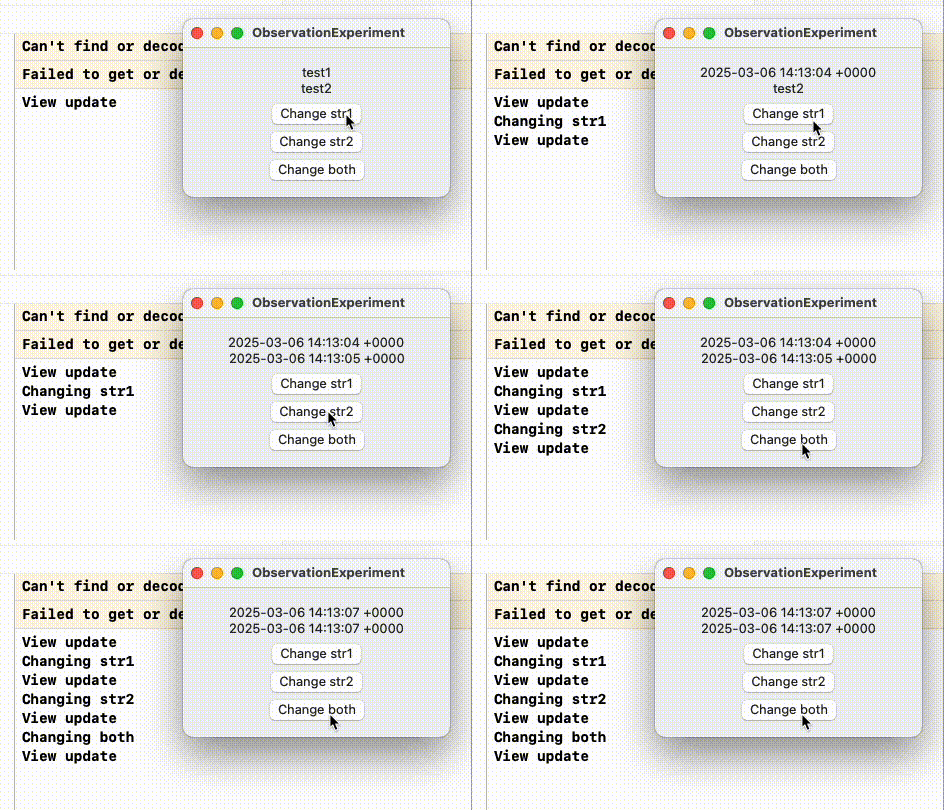
When we click on Change both, we notice that only one View update is emitted, even though both values are updated simultaneously. This indicates optimized performance, where views are recalculated only once, regardless of the number of modifications made to the object.
Changing a referenced object, example in a SwiftUI app
If we replace an object instead of modifying only the changing properties, we trigger a change at the object level, causing an update of all views that depend on its properties, even if those properties do not change:
import SwiftUI

@Observable
class TestClass {
    var ref = TestRef()
}
@Observable
class TestRef {
    var str1 = "test1"
    var str2 = "test2"
}

@main
struct TestApp: App {
    @State var test = TestClass()
    var body: some Scene {
        WindowGroup {
            View1()
            View2()
            Button("Change ref") {
                test.ref = test.ref
            }
        }
        .environment(test)
    }
}
struct View1: View {
    @Environment(TestClass.self) var test
    var body: some View {
        let _ = print("View1 update")
        Text(test.ref.str1)
    }
}
struct View2: View {
    @Environment(TestClass.self) var test
    var body: some View {
        let _ = print("View2 update")
        Text(test.ref.str2)
    }
}
Result:
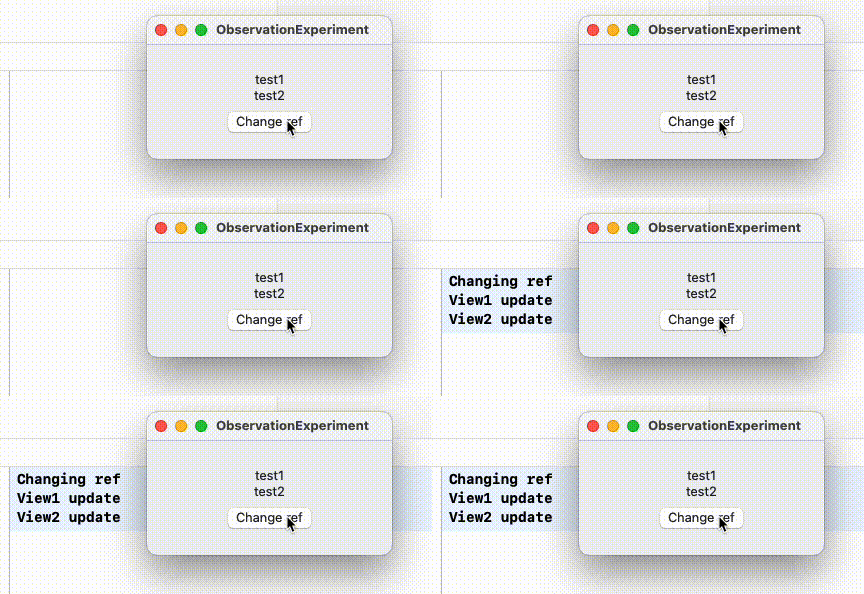
When clicking on Change ref, we find that both views update, even if the displayed data did not change. To optimize performance, it is therefore preferable to modify only the properties that have actually changed.
Conclusion
The Observation framework represents a significant advancement in managing reactivity within Swift applications. By offering fine-grained change tracking, it optimizes performance while simplifying dependency management. Developers must, however, keep in mind the need to transition to reference semantics and to manage read and write accesses judiciously.